Alvin's Club Channel for Claude
Write. Publish. Know what to try next.
Kecerdasan penerbitan sosial Anda: belajar dari performa konten dan menyempurnakan apa, di mana, dan kapan Anda menerbitkan.
Chat dengan ChannelUse with your AI assistant ↓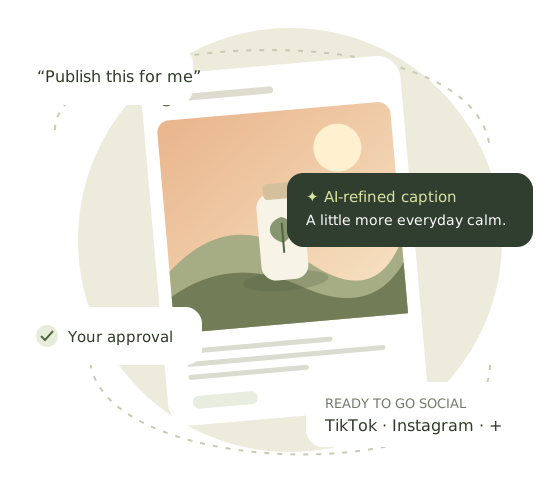
One place for every account you post to.
- 1
Semua tautan akun Anda, dikelola di Channel
Connect TikTok, Instagram and YouTube once, with one-time links you approve on each platform’s own page. Studio, Social and your AI assistant all post through the accounts you manage here.
- 2
Satu video, setiap akun, sesuai jadwal Anda
Terbitkan ke beberapa akun sekaligus, dengan caption, judul, dan hashtag untuk tiap platform, sekarang atau pada waktu yang Anda pilih.
- 3
Video yang bisa dibeli*
Tag your product on TikTok and up to 5 products on Instagram Reels, with a discount code.
- 4
Komentar yang menjual untuk Anda*
Pertanyaan produk dijawab otomatis, dan kode diskon Anda disematkan di komentar satu jam setelah posting.
- 5
Balas komentar dari satu tempat
Baca dan balas komentar TikTok dan YouTube tanpa membuka setiap aplikasi.
- 6
Tag merek Anda di Instagram
Mention @ akun merek Anda di setiap keterangan Reel.
- 7
Sembunyikan video kapan saja*
Keluarkan video dari tampilan publik tanpa menghapusnya.
- 8
Setiap hasil mengisi unggahan berikutnya
Tayangan, suka, dan komentar dari TikTok, YouTube, dan Instagram masuk ke Insight dan membentuk apa yang Channel tulis dan terbitkan berikutnya.
* Memerlukan paket Channel Max.
How to use Channel.
- 1
Connect your social accounts
Connect TikTok, Instagram, YouTube, a Facebook Page or another supported account in your workspace, or ask your AI assistant for a one-time connection link.
- 2
Choose a ready video
Ask Channel to write the post. It reads the video's product notes and writes titles, captions and hashtags for each platform.
- 3
Approve, publish and review
Check the exact caption, account and visibility. Channel publishes only after you approve, then helps you review results and plan the next test.
Hubungkan Alvin's Club Channel
Find it under Apps or Connectors in a supported AI assistant, or follow our setup steps.


CHANNEL PRICING
Post for every brand profile you run.
Pick a plan by how many brand profiles you run. Each plan shows how many accounts you can post to.
How many brand profiles do you run?
Starter
Best for 1 profile1 brand profile
Post to up to 6 accounts
TikTok · Instagram · YouTube Shorts · X · LinkedIn · Hashnode
1 account each, per profile
6 accounts on your profile
- X posts without links
- Unlimited posts everywhere else
- You approve every post
Mulai gratis dengan Starter$11.99/mo paid yearly
atau $14.99 month-to-month · Save $36 a year
Free for 7 days. Cancel anytime.
Pro
Best for 2 profiles2 brand profiles
Post to up to 12 accounts
TikTok · Instagram · YouTube Shorts · X · LinkedIn · Hashnode
1 account each, per profile
6 accounts on each of your 2 profiles
- 40 X link posts a month
- Unlimited posts everywhere else
- You approve every post
Mulai gratis dengan Pro$19.99/mo paid yearly
atau $24.99 month-to-month · Save $60 a year
Free for 7 days. Cancel anytime.
Business
Best for 3–4 profiles4 brand profiles
Post to up to 24 accounts
TikTok · Instagram · YouTube Shorts · X · LinkedIn · Hashnode
1 account each, per profile
6 accounts on each of your 4 profiles
- 60 X link posts a month
- Unlimited posts everywhere else
- You approve every post
Mulai gratis dengan Business$29.99/mo paid yearly
atau $38.99 month-to-month · Save $108 a year
Free for 7 days. Cancel anytime.
Only X posts with a link count toward a limit. Need more? 1 credit = 2 extra X link posts.
HOW IT ADDS UP · PRO EXAMPLE
ExampleProfile 1 · 6 accounts
Profile 2 · 6 accounts
12 accounts
on one Pro plan, posting from both profiles
Pro with 2 brand profiles → 6 accounts each → you post to all 12 accounts. X posts with a link share 40 a month.
Need videos?
Make them in Studio — 3 credits per 8-second video.
Nothing goes live without your approval.
Channel writes the caption and shows the exact post. You approve before it’s published.
Connecting accounts is always free.
Your plan sets how many accounts you post to.
A few useful answers.
Is Alvin's Club Channel in the Claude directory?
Yes. Alvin's Club Channel (also written Alvins Club Channel or AlvinsClub Channel) is listed in the Claude directory: https://claude.ai/directory/alvins-club-channel. Open it, click Connect and sign in on the Alvin's Club authorization page.
How do I connect Alvin's Club Channel to Claude?
Click Connect in the Claude directory listing, or add a custom connector with the server URL https://studio.alvinsclub.ai/channel/mcp. Sign in on the Alvin's Club page and enable Channel in a new chat. Then connect your social accounts: ask Claude for a one-time connection link, or add them in Post channels on the website.
What does Alvin's Club Channel cost?
Adding the connector and connecting accounts are free. Posting to TikTok, Instagram, YouTube and Facebook Pages needs a Channel plan: Starter, Pro or Business, each with a 7-day free trial. The Pro and Business plans add X. Plans and prices are on this page.
How do I connect my AI assistant?
1. Copy the Channel server address
https://studio.alvinsclub.ai/channel/mcp
Name: Alvin's Club Channel. Choose OAuth sign-in. Connect on the secure authorization page. If you use an API key, enter it under Other ways to sign in, never in chat.
Channel publishes existing content. For video creation, use Studio setup guides.
2. Choose your assistant
Claude
Channel is in the Claude directory. Open Alvin's Club Channel in Claude, click Hubungkan and sign in on the secure authorization page. Then enable it in a new chat.
Or add it yourself:
- Open Customize → Connectors → Add → Add custom connector.
- Enter the name and address, Continue, then Sign in now and Register automatically. Leave headers empty.
- Complete authorization and enable it in a new chat.
Account and workspace policies apply; an owner may need to add it first.
Official Claude instructionsGrok Bot
Open Connect apps, choose custom MCP server and Remote HTTPS, then complete OAuth sign-in. Or ask your Bot:
Add a custom remote MCP connector named Alvin's Club Channel. Server URL: https://studio.alvinsclub.ai/channel/mcp. Use OAuth sign-in. Read https://studio.alvinsclub.ai/channel/mcp-guide. Show me the secure authorization link, then check my connected accounts. Do not publish anything.
Type @ and select Channel after connecting. Availability depends on account and team policy.
Official Grok Bot instructionsChatGPT
- Open Plugins → Add → Add custom MCP server.
- Enter the name and server address, choose OAuth, review permissions and create the plugin.
- Authenticate, start a new chat, type @ and select Channel.
If unavailable, ask your administrator or use the web workspace.
Official ChatGPT instructionsMeta Muse
Ask Muse to create a custom connector:
Add a custom remote MCP connector named Alvin's Club Channel. Server URL: https://studio.alvinsclub.ai/channel/mcp. Use OAuth sign-in. Read https://studio.alvinsclub.ai/channel/mcp-guide. Show me the secure authorization link, then check my connected accounts. Do not publish anything.
Complete its secure sign-in flow. If your version cannot connect, use the web workspace. A setup message does not establish a successful connection.
Official Meta instructionsHow do I connect my social accounts?
Use Alvin's Club Channel to show my connected social accounts and available platforms. Do not publish anything.
Connecting an assistant does not connect social accounts. Add those in Saluran unggah, then check again.
Can AI help with captions and publishing times?
Read my ready Studio videos and connected accounts. Write platform-specific titles, captions and hashtags grounded in the product notes. Show drafts and facts I should verify. Do not publish yet.
Connect Studio for product video creation. Channel's own tools do not generate images or video.
Analyze my chosen account and recommend the next posting time in its timezone. Show evidence, use the default if history is insufficient, and wait for approval before scheduling or moving a post.
Channel starts with daily platform defaults. At least 30 comparable posts and enough observations in two slots can support a timing experiment. It never silently changes an approved schedule. Native and provider features differ; TikTok provider posts are public only.
Will anything publish without my approval?
Prepare a post for my chosen ready video. Ask which connected account to use. Show the exact caption, media and visibility, and wait for approval before publishing.
After approval, ask for the final status and platform link. A queued upload is not yet a published post.
How do I improve posts using my results?
Read authorized history of my selected native account, including videos published outside Studio. Compare similar-age content and available watch metrics. Give an evidence-linked production brief and timing experiment. State missing data; do not publish.
YouTube watch reports and Instagram media insights need additional permission. TikTok catalog access requires video.list and exposes public videos only. Missing retention, clicks or sales remains unknown. Counters are cumulative when observed; period reports are labeled separately.
Can I analyze provider history or review a video?
Existing YouTube and Instagram provider connections support cached history and interpretation, with coverage, ambiguous counts and unknown collection times stated. Cache does not establish a current complete catalog or personalized posting times. Advanced provider insights, LinkedIn analytics and Hashnode analytics remain unavailable.
Read my selected owned account's authorized history using its native or provider connection. Show coverage, collection time and missing metrics. Suggest a next-content experiment without publishing or changing schedules.
For an owned ready Studio video, Channel can inspect up to five sampled frames, including the first, using your shared writing allowance. Sparse frames cannot establish audio, continuous motion, retention, CTR or sales. External-only videos are not visually inspected.
Review the first and other sampled frames of my chosen ready Studio video. Cite frame numbers and suggest one production change. Keep unverified facts explicit. Do not generate or publish.
Connected, but cannot publish?
Check the selected account, platform permissions and Channel subscription. Features vary. TikTok provider posts are public only and need approval. If tools are missing, enable the connector, refresh tools and start a new chat. Reconnect expired authorization; remove assistant connections in the assistant's settings.
Do I need to wait for marketplace approval?
No. Channel is live in the Claude directory. ChatGPT, Grok Bot and Muse listings are under review; until then a custom connection works there, subject to account availability. Or use Channel on the web.
Technical documentation · Hubungi dukunganSetup checked October 30, 2026. Menus and eligibility can change. Claude, ChatGPT and Grok Bot connections were tested; Muse describes its custom-connector path, not a completed Channel publishing test.